If your device isn't charging as expected, or you've noticed it doesn't run as long as it used to, this article will help you confirm correct charging behavior and understand what to expect from battery performance over time.
In this article you will learn how to verify correct charging and determine whether your battery's performance is normal or indicates a problem.
We want to make sure that:
- Your device is charging correctly
- You understand what normal battery aging looks like
- You know your replacement options
For this procedure you will need:
- Your Device
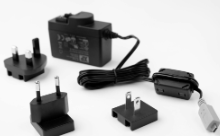
- Power Charger (picture below)
---
Section 1: Verify Correct Charging Setup
1. Connect your device using the power charger, not the USB isolator. The USB isolator is designed for data connection during recording, not for charging.
2. Check the LED on the device.
→ If the LED turns yellow/orange: charging is in progress — proceed to Section 2.
→ If the LED does not turn on:
- confirm the charger is plugged into a working outlet
- change to another power outlet,
- try with another power supply (if you have one)
- try the original power supply with another device (if you have one)
→ If none of these steps turn on the led on your device, it is very likely that your device needs a repair, proceed to Section 4.
Section 2: Confirm Full Charge
1. Leave the device connected to the power charger
2. Wait for the LED to change color.
→ If the LED turns green: the device is fully charged.
→ If the LED remains yellow/orange for longer than 6 hours, proceed to Section 4.
Section 3: Understand Battery Performance Over Time
As with all lithium-ion batteries, capacity naturally decreases with age and with repeated charging. This is expected behavior, not a defect — you may notice shorter runtime or shorter time between charges as your device gets older or sees heavier use.
The expected capacity loss is a 5% per year + 20% every 300 charging cycles
If your device´s battery lasts too short that it has become hard or not practical to use it, please proceed to Section 4.
Section 4: Start a Repair / Replacement Process
- If the battery is underperforming within the first year of purchase: it will be replaced free of charge.
- If it has been more than one year since purchase: it can be replaced with a service fee.
To request a replacement or repair, go to: I need a Replacement / Repair
Was this article helpful?
That’s Great!
Thank you for your feedback
Sorry! We couldn't be helpful
Thank you for your feedback
Feedback sent
We appreciate your effort and will try to fix the article