If your device isn't charging as expected, or you've noticed it doesn't run as long as it used to, this article will help you confirm correct charging behavior and understand what to expect from battery performance over time.
In this article you will learn how to verify correct charging in your device.
We want to make sure that:
- Your you are using the approppiate power charger
- You know your replacement options
For this procedure you will need:
- Your Device
- Power Charger (picture below)
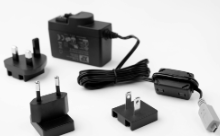
1. Connect your device using the power charger, not the USB isolator. The USB isolator is designed for data connection during recording, not for charging.
2. Check the LED on the device.
→ If the LED turns yellow/orange: charging is in progress, problem solved.
→ If the LED does not turn on:
- confirm the charger is plugged into a working outlet
- change to another power outlet,
- try with another power supply (if you have one)
- If the other power supply charges your device, then you need to replace the power charger
- try the first power charger with another device (if you have one)
- If the other device is charged by the original power supply, then you need to repair your device.
To request a replacement or repair, go to: I need a Replacement / Repair
Was this article helpful?
That’s Great!
Thank you for your feedback
Sorry! We couldn't be helpful
Thank you for your feedback
Feedback sent
We appreciate your effort and will try to fix the article