Previous articles:
I can´t connect to my device via WiFi
If your Enobio or Starstim device is disconnecting from Wi-Fi during a stimulation or recording session, this article explains why it happens and how to fix it.
In this article you will learn how to resolve Wi-Fi disconnection issues by updating your NIC2 software.
Root Cause
Wi-Fi disconnections can occur due to a crowded wireless environment or the nature of wireless communication itself. In versions up to NIC 2.1.4.1, the software allowed a maximum reconnection delay of 7 seconds — a window that is not always sufficient to recover the connection in real-world conditions.
Solution
NIC 2.1.4.2 resolves this by increasing the allowed reconnection delay to 60 seconds, significantly improving connection stability during sessions.
What you will need:
- The NIC 2.1.4.2 (or later )installer (download link below)
Section 1: Update NIC2 to Version 2.1.4.2 or later
- Close NIC2 if it is currently open.
- Download the NIC 2.1.4.2 installer: Download the latest version of NIC
- Run the installer and follow the on-screen instructions.
- Once installation is complete, open NIC2 and confirm the version number in the software settings.
→ If the version now shows 2.1.4.2: your software is up to date. Test your connection during your next session.
Disable Automatic Wi-Fi Connection
Sometimes, Windows automatically prioritizes other Wi-Fi networks, which may prevent your device from connecting properly.
Method A:
Close NIC and switch the device off and on again.
Ensure “Connect automatically” is disabled for your internet-providing Wi-Fi network.
Reopen NIC and connect your device using the Windows Wi-Fi interface.
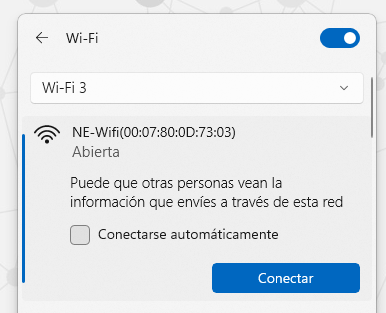
Once connected, return to NIC and click “USE THIS DEVICE.”
Method B:
Open your PC’s Wi-Fi settings and locate the NECBOX network.
Select “Forget this network”, search for a duplicate "NE-Wfi(xx:xx:xx:xx...) 2" and forget it too.
Reconnect to NECBOX
Open NIC settings and re-establish the Wi-Fi connection.
Confirm NIC2 Software Version
Make sure you have the latest version of NIC2 installed on your PC for optimal performance.
Disable Unnecessary Features
If not using Markers via LSL, disable the LSL server and synchronization options for better performance.
If this does not solve the disconnections proceed to:
Change WiFi Channel
Was this article helpful?
That’s Great!
Thank you for your feedback
Sorry! We couldn't be helpful
Thank you for your feedback
Feedback sent
We appreciate your effort and will try to fix the article