Congratulations on acquiring your Neuroelectrics device.
Neuroelectrics provides specialized training for all new users at the time of device acquisition. This training is designed to maximize your device performance and accelerate your success with the platform.
To make the most of your training session, follow this preparation guide to ensure your device, software, and information are ready.
What You'll Need
- Your Neuroelectrics device and all accessories
- A computer with admin permissions (Windows or macOS)
- Stable internet connection
- Device serial number (found on the back of your device and on the Kit box - E2026xxxx-xx)
- The provided USB isolator cable and power supply unit
8 Steps to Prepare
1. Download and Install NIC Software
Visit the Neuroelectrics support portal and download the NIC software for your operating system.
- Windows: Follow the Windows installation guide and ensure you have admin permissions to be able to install NIC and to connect your device via WiFi
- macOS: Follow the macOS installation guide with the same admin permissions requirement
- If the installation can not be achieved, note it and install Anydesk from step 7
2. Fully Charge Your Device
Connect your device to the provided power supply unit and allow it to charge completely before the training session.
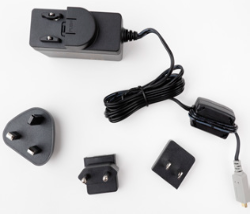
- A fully charged device ensures uninterrupted hands-on practice
- Most Neuroelectrics devices require 2 - 4 hours for a complete charge
3. Gather Your Accessories
Locate your USB isolator cable and review all items included in your device package.
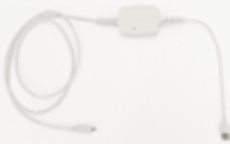
- The USB isolator cable will be used during the training for device connection
- Keep all accessories in an accessible location
4. Test Your Internet Connection
Verify that you have a stable, reliable internet connection at the location where you will attend the training.
- A stable connection is essential for NIC software operation and video conferencing
5. Locate Your Device Serial Number
Find and note the serial number of your device, which will be needed for registration.
- Device serial number (found on the back of your device and on the Kit box - E2026xxxx-xx)
- You will provide this number when booking your training session
6. Share Your Use Case
Think about the specific application or use case you plan to use your device for (optional but recommended).
- Examples: clinical assessment, research protocol, rehabilitation training, biofeedback
- Knowing your use case helps the training team tailor the session to your needs
7. Download AnyDesk (for assistance)
Download and install AnyDesk on the same computer you'll use for training.
- This will only be used if remote assistance is needed during the session
- It will not be accessed otherwise
8. Book Your Training Session
Book a meeting with Neuroelectrics´ Support team
- Have ready: your name, company/institution, device serial number, and your preferred use case
- Training is available in English or Spanish
- You will receive a meeting link via email
9. What to Expect During Training
Your training session will cover three core areas:
- Your Device Kit: A complete walkthrough of all components, accessories, and how to use each one
- NIC Software Basics: How to launch the software, configure settings, load protocols, and monitor data quality
- Hands,On Practice: A practical session using your specific use case, with live troubleshooting and Q&A support
Ready to Get Started?
Was this article helpful?
That’s Great!
Thank you for your feedback
Sorry! We couldn't be helpful
Thank you for your feedback
Feedback sent
We appreciate your effort and will try to fix the article