When a Protocol is created with no assigned Channels, and then saved, NIC will crash.
When that same Protocol is selected to be deleted or opened, NIC will crash.
The solution is to create a protocol and assign channels.
To delete the protocol with no channels, a special procedure needs to be done:
First of all, close NIC.
In Windows, go to Documents/NIC/templates
Open "protocols2_0.tdb" with a text editor, you will see something like this:
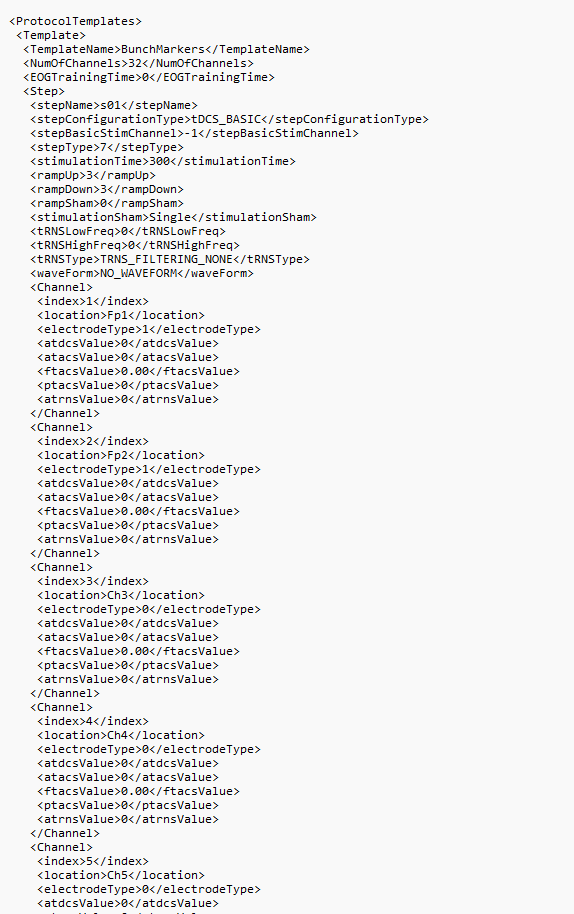
The structure of the file is:
<ProtocolTemplate>
<Template>
Template0Name
NumberOfChannels
EOGTrainingTime
Step0
Step0Config
Channel0Config (If StimulationStep)
Channel1Config (If StimulationStep)
...
Step1
Step1Config
...
...
<Template>
<Template>
Template1Name
NumberOfChannels
EOGTrainingTime
Step0
Step0Config
Channel0Config (If StimulationStep)
Channel1Config (If StimulationStep)
...
Step1
Step1Config
...
...
<Template>
<ProtocolTemplate>
To erase a Protocol, it is necessary to delete what is between the <Template> for a specified TemplateName, then save the file.
After that reopen NIC and verify that the Protocol no longer exists.
Was this article helpful?
That’s Great!
Thank you for your feedback
Sorry! We couldn't be helpful
Thank you for your feedback
Feedback sent
We appreciate your effort and will try to fix the article