1. Open Notepad app, paste the following:
-
mkdir Debug
"C:\Program Files (x86)\Neuroelectrics\NIC2\NIC2" debugFile NE-Wifi(00:00:00:00:00:00)
-
Save it as "DoDebug2.txt"
2. Place it in Documents/NIC
3. Ensure that you can see file extensions by searching File Explorer options --> View tab --> Untick 'Hide extensions for known file types'. See image below.
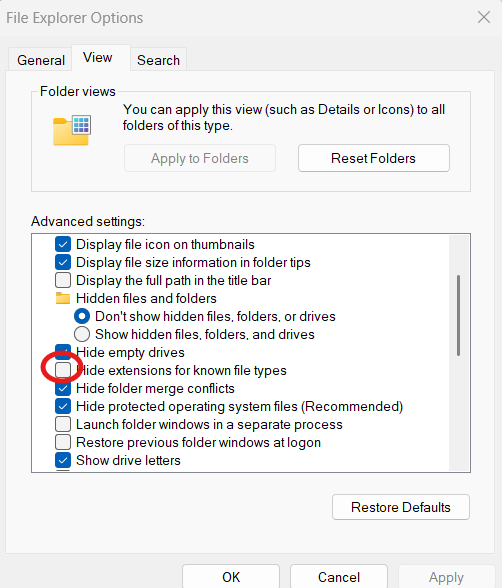
5. Go to the file, rename it, deleting the extension '.txt' for '.bat'
6. Ensure NCI2 is closed
6. Execute the file
7. NIC2 will be opened in Debug mode, a folder called Debug will be created in Documents/NIC, this will store logfiles.
8. Try to reproduce your issue and send the Debug folder -in Documents/NIC - to support@neuroelectrics.com
Please note that, depending on local IT permissions, maybe you are not able to execute .bat files. FYI, .bat files open a command line in your computer and execute the commands that are programmed into the file.
While helpful in most scenarios, unfortunately, most computer viruses operate as .bat files, which is why IT departments set up measures.
Was this article helpful?
That’s Great!
Thank you for your feedback
Sorry! We couldn't be helpful
Thank you for your feedback
Feedback sent
We appreciate your effort and will try to fix the article